On this page
- Know Your Documents, Fees and Timeline — Before You Apply
- What is eDistrict UP — The State's Digital Service Engine
- eDistrict, eSathi, and CSC — Three Names, One System
- Certificate Fees — eSathi vs CSC (2026)
- Certificates Available on eDistrict UP
- How to Register and Login on eSathi
- How to Check Application Status
- How to Download Your Certificate
- How to Verify Any Certificate
- 8 Common Problems — Quick Fixes
- Janhit Guarantee Adhiniyam, 2011 — Your Legal Right
- Self-Declaration Form — Quick Reference
- Quick Info Table
- FAQs
- Contact
Know Your Documents, Fees and Timeline — Before You Apply
Select certificate type + application method. Get: required documents with file specs, exact fee, processing timeline, validity period, and top rejection reasons.
Documents
- Aadhaar
- self-declaration form
- ration card
- salary slip (salaried) or Gram Pradhan letter (rural/farming)
Self-declaration form required
Must be JPEG — the portal rejects PDF for this specific document. Unsigned forms are the #1 rejection cause.
Self-Declaration Form Page →Self-declaration form required
Must be JPEG — the portal rejects PDF for this specific document. Unsigned forms are the #1 rejection cause.
Self-Declaration Form Page →Self-declaration form required
Must be JPEG — the portal rejects PDF for this specific document. Unsigned forms are the #1 rejection cause.
Self-Declaration Form Page →Documents
- Family ID (Ek Parivar Ek Pahchan) from familyid.up.gov.in
Self-declaration form required
Must be JPEG — the portal rejects PDF for this specific document. Unsigned forms are the #1 rejection cause.
Self-Declaration Form Page →Documents
- Hospital births: hospital report
- Home births in rural UP: Anganwadi worker records, Dai (midwife) declarations, or Gram Pradhan certificates
Documents
- Hospital deaths: hospital death report
- Home deaths: Gram Pradhan certificate (rural) or police panchnama (urban/unnatural)
File requirements
- Each file under 100KB, JPEG or PDF.
- Self-declaration form must be JPEG not PDF.
- Scan black & white at 200 DPI.
Top rejection reasons
- blurry scans
- Aadhaar name mismatch
- missing self-declaration form
- wrong Rural/Urban
- Lekhpal couldn't verify at address
Fees subject to change. Verify at edistrict.up.gov.in before applying.
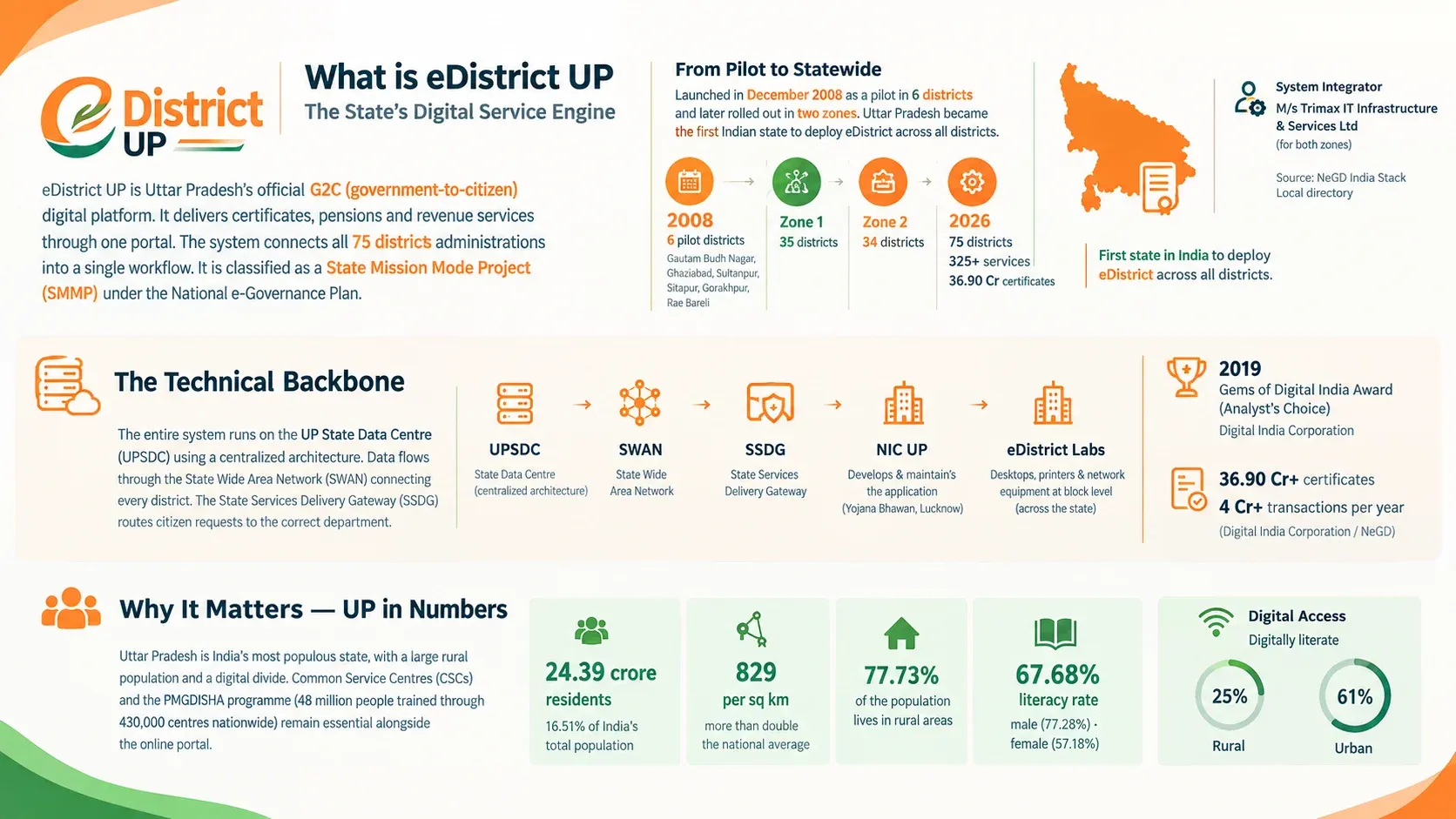
What is eDistrict UP — The State's Digital Service Engine
eDistrict UP is Uttar Pradesh's official G2C (government-to-citizen) digital platform. It delivers certificates, pensions, and revenue services through one portal. The system connects all 75 district administrations into a single workflow. It is classified as a State Mission Mode Project (SMMP) under the National e-Governance Plan (source: NeGD).
The platform launched in December 2008 as a pilot in 6 districts — Gautam Budh Nagar, Ghaziabad, Sultanpur, Sitapur, Gorakhpur, and Rae Bareli. After successful pilot implementation, the state rolled it out in two zones. Zone 1 covered 35 districts, Zone 2 covered the remaining 34. M/s Trimax IT Infrastructure & Services Ltd served as System Integrator for both zones (source: NeGD India Stack Local directory). Uttar Pradesh became the first Indian state to deploy eDistrict across all districts.
- 20086 pilot districts
- Zone 135 districts
- Zone 234 districts
- 202675 districts, 325+ services, 36.90 Cr certificates
The Technical Backbone
The entire system runs on the UP State Data Centre (UPSDC) using a centralized architecture. Data flows through the State Wide Area Network (SWAN) connecting every district. The State Services Delivery Gateway (SSDG) routes citizen requests to the correct department. NIC UP State Unit at Yojana Bhawan, Lucknow developed and maintains the application. eDistrict Labs with desktops, printers, and network equipment operate at block level across the state (source: NeGD directory).
In 2019, the platform received the Gems of Digital India Award (Analyst's Choice) from the Digital India Corporation. NIC UP describes it as the state's "flagship e-governance initiative" (source: up.nic.in, July 2026). Today, 36.90 crore+ certificates have been issued, with 4 crore+ transactions processed every year (source: Digital India Corporation / NeGD).
Why It Matters — UP in Numbers
Uttar Pradesh is India's most populous state with an estimated 24.39 crore residents — 16.51% of India's total population (source: Census 2011 projection). The population density is 829 per sq km, more than double the national average. Nearly 77.73% of the population lives in rural areas. The state's literacy rate is 67.68%, with a 20-point gap between male (77.28%) and female (57.18%) literacy (source: Census 2011).
Digital access adds another layer. Only 25% of rural Indians are digitally literate compared to 61% in urban areas (source: CBWE). In UP, where over 3/4th of the population is rural, this gap defines who can use the portal and who cannot. This is why Common Service Centres (CSCs) and the government's PMGDISHA programme (48 million people trained through 430,000 centres nationwide) remain essential alongside the online portal.
eDistrict, eSathi, and CSC — Three Names, One System
People search "eDistrict UP login" and "eSathi login" thinking they are different. They are part of the same system. eDistrict is the backend project connecting government offices. eSathi (eServices Access To Help Individuals) at esathi.up.gov.in is the citizen portal where you register, login, apply, pay, and download. You never interact with eDistrict directly.
CSC (Common Service Centre), also called Jan Seva Kendra or Lokvani Kendra, is the physical option. Over 5.5 lakh CSCs operate across India. In UP, they serve citizens who lack internet access or digital literacy. The CSC operator logs in through eseva.csccloud.in using their own VLE credentials — not your account. You receive a Service Request Number (SRN) and track your application independently.
| eDistrict | eSathi | CSC | |
|---|---|---|---|
| Type | Backend system | Citizen portal | Physical centre |
| Used by | Government officers | Citizens directly | Operators on your behalf |
| URL | edistrict.up.gov.in | esathi.up.gov.in | locator.csccloud.in |
| Cost | — | ₹10–15/certificate | ₹30 + ₹30–50 extra |
Mobile app note: The eSathi Android app (v3.2) was removed from Google Play in August 2024. The web portal works on any mobile browser. Use Chrome for best compatibility.
Old URL note: edistrict.up.nic.in was the previous address. It now redirects to edistrict.up.gov.in automatically.
Certificate Fees — eSathi vs CSC (2026)
Self-service through eSathi costs ₹10–15 per certificate. The same certificate through a CSC costs ₹30 government fee plus ₹30–50 facilitation. Applying yourself saves 4–6x the cost. All eSathi payments go through PAYGOV — UPI, net banking, and debit card accepted.
| Certificate | eSathi | CSC | Processing | Validity |
|---|---|---|---|---|
| Income (आय) | ₹10–15 | ₹30+ | 7–15 days | 3 years |
| Caste SC/ST (जाति) | ₹10–15 | ₹30+ | 7–15 days | Lifetime |
| Caste OBC NCL | ₹10–15 | ₹30+ | 7–15 days | 1–3 years |
| Domicile (निवास) | ₹10–15 | ₹30+ | 7–15 days | Lifetime |
| Birth (जन्म) | ₹10–15 | ₹30+ | 7–15 days | Permanent |
| Death (मृत्यु) | ₹10–15 | ₹30+ | 7–15 days | Permanent |
| Haisiyat (हैसियत) | ₹120 | ₹120+ | 15–21 days | 3 years |
| EWS | ₹10–15 | ₹30+ | 7–15 days | 1 fin. year |
| Character (चरित्र) | ₹10–15 | ₹30+ | 7–15 days | 6 months |
| Employment (रोज़गार) | ₹10–15 | ₹30+ | 7–15 days | Varies |
Fees subject to change. Verify at edistrict.up.gov.in before applying. Active officers in some districts process applications in 3–5 days.
Certificates Available on eDistrict UP
Income Certificate (आय प्रमाण पत्र)
Certifies annual family income from all sources — salary, pension, rent, agriculture, business. Issued by the Tehsildar under the Revenue Department. Valid for 3 years in UP, which is longer than most states where validity is just 1 year. Required for UP Scholarship (Saksham portal), Ayushman Bharat (PMJAY), EWS quota in IIT/NIT/AIIMS, PMAY housing scheme, and fee concessions.
Key documents: Aadhaar + self-declaration form + ration card + salary slip (salaried) or Gram Pradhan letter (rural/farming). The Saksham portal API verifies the certificate directly against eDistrict database — expired or invalid certificates block scholarship submission with a "Data Mismatch" error.
Caste Certificate (जाति प्रमाण पत्र)
Confirms SC, ST, or OBC category as listed in the Presidential Orders for UP. SC/ST certificates have lifetime validity. OBC Non-Creamy Layer (NCL) certificates need renewal — 1 financial year for central purposes (UPSC, SSC, Railway), up to 3 years for state. NCL threshold: family income below ₹8 lakh per year, with salary and agricultural income excluded from the calculation (source: DoPT).
Critical distinction: central OBC list (ncbc.nic.in) and state OBC list differ. A caste in the UP state list may not appear in the central list. Check the correct list before applying. Required for UPSC/UPPSC/SSC reservation, NEET/JEE reserved seats, UP Scholarship, and government job age relaxation (5 years SC/ST, 3 years OBC).
Domicile Certificate (निवास प्रमाण पत्र)
Proves permanent residence in Uttar Pradesh. Two types exist — Mool Niwas Praman Patra (permanent domicile) and Samanya Niwas Praman Patra (ordinary residence). For NEET state quota, UP government jobs, and UP Scholarship, you need the Mool Niwas specifically. The Samanya Niwas is not accepted for state quota claims.
Family ID (Ek Parivar Ek Pahchan) from familyid.up.gov.in is now mandatory for domicile applications on eSathi. Eligibility: born in UP with ancestral residence, OR 3+ years continuous residence, OR parents are permanent UP residents. Lifetime validity, though some job notifications require a certificate issued within the last 3 years.
Birth Certificate (जन्म प्रमाण पत्र)
Records child's name, date of birth, place, parents' details. The primary age document for school admission under RTE Act 2009 — though Section 14(2) bars a school from denying admission for lack of age proof — plus passport application and Aadhaar enrollment for children under 5. Three portals serve birth certificates in UP — CRS (crsorgi.gov.in) for recent hospital births, e-Nagarsewa (e-nagarsewa.up.gov.in) for urban/Nagar Nigam births, and eSathi for older records. Register within 21 days — free. After 1 year, magistrate order required.
For home births in rural UP, Anganwadi worker records, Dai (midwife) declarations, or Gram Pradhan certificates replace the hospital report. Child's name can be added within 1 year of registration — initial registration can proceed without a name.
→ Deep dive: Birth, Death & Parivar Register Guide
Death Certificate (मृत्यु प्रमाण पत्र)
Documents date, place, and cause of death. Required for insurance claims (LIC and private), property succession at sub-registrar, pension transfer, bank account closure, and ration card update. Without it, no financial or legal action can proceed after a person's passing.
Hospital deaths: hospital death report is the primary document. Home deaths: Gram Pradhan certificate (rural) or police panchnama (urban/unnatural). Register within 21 days — free. After 30 days, written permission from District Registrar. After 1 year, magistrate order. The Registration of Births and Deaths Act, 1969 governs all timelines. Order at least 5–10 certified copies — each institution needs a separate original.
→ Deep dive: Birth, Death & Parivar Register Guide
Parivar Register Nakal (परिवार रजिस्टर नकल)
Certified copy of the family register maintained at Gram Panchayat level. Lists all family members with relationships, dates of birth, and occupations. NOT the same as UP Family ID (familyid.up.gov.in) — completely different systems. Parivar Register = traditional panchayat record. Family ID = new 12-digit digital identifier with 3.06 crore IDs covering 12.63 crore beneficiaries.
Required for ration card applications, pension claims, property succession, and court cases. Official validity 6 months, but courts and pension offices often reject copies older than 3 months. Corrections happen at Gram Panchayat Secretary level first — online system only provides a copy of the physical register.
→ Deep dive: Birth, Death & Parivar Register Guide
Other Certificates
Haisiyat (Solvency): Property and income status proof for government contracts, tenders, and surety bonds. Fee ₹120 — higher than other certificates. Takes 15–21 days due to property verification through revenue records (Khatauni from upbhulekh.gov.in).
EWS: Economically Weaker Section certificate for 10% reservation in central government jobs and IIT/NIT/AIIMS. General category only — SC/ST/OBC not eligible. Expires every March 31 regardless of issue date. Income below ₹8 lakh + asset criteria (agricultural land below 5 acres, flat below 1000 sq ft).
Character: Good conduct certificate for government jobs and some visa applications. Validity 6 months to 1 year. Different from Police Clearance Certificate (PCC) — character certificate comes from revenue authority, PCC from police.
Employment: Employment registration certificate through Sewayojan portal. Required for some government recruitment notifications.
Varasat (Inheritance/Mutation): Property mutation after death of landowner. The revenue department updates land records (Khatauni) to reflect new ownership. Requires death certificate + legal heir certificate + parivar register. Processing involves Lekhpal verification and Tehsildar approval.
How to Register and Login on eSathi
- Login ID
- Password
- Captcha
- New User Registration
What You Need Before Starting
An Aadhaar-linked mobile number — OTP verification is mandatory. Your Aadhaar number — e-KYC pulls your name, DOB, and photo automatically. Internet access — Chrome browser recommended for best portal compatibility. An email address — optional but useful for password recovery.
Registration — Step by Step
Go to edistrict.up.gov.in, click "Citizen Login (eSathi)." You land on esathi.up.gov.in. Click "नवीन उपयोगकर्ता पंजीकरण" (New User Registration). Create a Login ID — 6 to 8 characters, alphanumeric (e.g., atul123, raj2026). Click "Check Availability" to confirm it's free. This is your permanent username — write it down.
Fill: name (exactly as on Aadhaar), DOB, gender, address + PIN, district, mobile, email. Enter captcha, click Save. Aadhaar OTP arrives on your linked mobile — enter it. First login: use Login ID + OTP as temporary password. System prompts you to set a permanent password. Done — registration is free.
Login After Registration
esathi.up.gov.in → Login ID + Password + Captcha → Submit → Dashboard.
Forgot Password: Login page → "पासवर्ड भूल गए" → Registered mobile → OTP → New password. Forgot Login ID: "लॉगिन आई.डी. भूल गए" → Registered mobile → ID sent via SMS. Mobile number changed: Call 0522-2304706 or email ceghelpdesk@gmail.com with your Login ID.
Three Login Types
Citizen (eSathi) — what you use. esathi.up.gov.in. CSC Operator — uses VLE credentials at eseva.csccloud.in. Never share your eSathi password with any CSC operator. Department — for Lekhpal, Tehsildar, SDM. Internal administrative portal. Citizens never use this.
10 Common Login Errors — Fixes
- 1. "Login ID already exists" — Choose different ID. Add numbers: atul2026, rajup07.
- 2. OTP not received — Verify Aadhaar-linked number. Wait 2–3 min cooldown. Check SMS spam folder. Try 6–8 AM during peak seasons (Jul–Sep). Disable DND temporarily. Some carriers block transactional SMS with DND active.
- 3. Captcha failing — Clear browser cache. Use Chrome. Try incognito (Ctrl+Shift+N). Disable ad-blockers. Click refresh icon next to captcha for a new one.
- 4. "Invalid Login ID or Password" — Login ID is your 6–8 char username, NOT mobile number. Check Caps Lock. Use "Forgot Password" if needed.
- 5. "Mobile number already registered" — One number = one account. Use "Forgot Login ID" to recover existing account.
- 6. Portal not loading / server error — Peak traffic during scholarship season (Jul–Sep) and exam periods. Try 6–8 AM or after 10 PM. Chrome recommended. Clear cache. Switch Wi-Fi/mobile data.
- 7. "Session expired" — Portal times out after 15–20 min inactivity. Keep details ready. Fill form quickly without pauses.
- 8. Aadhaar e-KYC failed — Mobile number not linked to Aadhaar in UIDAI database. Recently changed Aadhaar-linked number? Wait 48 hours for propagation. UIDAI servers occasionally down — try later.
- 9. Entered wrong Aadhaar number — e-KYC pulls data from whatever Aadhaar you enter. If you mistype, the wrong person's details auto-fill. Re-check all 12 digits before submitting e-KYC step.
- 10. Want to change registered mobile number — No self-service option exists on the portal currently. Contact helpline 0522-2304706 or email ceghelpdesk@gmail.com with your Login ID and identity proof for manual update.
How to Check Application Status
Without Login — Fastest Method
Open edistrict.up.gov.in. Click "आवेदन की स्थिति" (Application Status). Enter your Service Request Number (SRN) — received via SMS at submission, also visible in eSathi dashboard. Enter captcha. Click Search.
With Login
esathi.up.gov.in → Login → Dashboard shows all applications with SRN, type, date, status. Click any application for officer name and remarks.
Status Labels Explained
| Status | Meaning | Action |
|---|---|---|
| प्रेषित (Submitted) | Received by system | Wait 1–2 days for assignment |
| सत्यापनाधीन (Under Verification) | With Lekhpal/Revenue Inspector | Longest stage: 5–10 days |
| लेखपाल रिपोर्ट प्रतीक्षित | Lekhpal hasn't filed report | Wait up to 15 days, then escalate |
| तहसीलदार को अग्रेषित | Verification done, with Tehsildar | 2–5 days for review + signing |
| स्वीकृत (Approved) | Approved, PDF generating | Wait 24–48 hours |
| प्रमाण पत्र जारी (Generated) | Ready for download | Go to #download |
| अस्वीकृत (Rejected) | Rejected — check reason in eSathi | Fix issue, reapply. No penalty. |
| संशोधनाधीन (Correction) | Minor fix needed | Login, correct, resubmit. Same SRN. |
- 1You Submit
- 2System Assigns1–2 days
- 3Lekhpal Verifies5–10 daysMost delays happen here
- 4Tehsildar Signs2–5 days
- 5Approved24–48 hours
- 6Certificate Generated
SRN vs Certificate Number
SRN = tracking number from submission. Use on status page. Certificate Number = printed on the final approved document. Used by third parties (universities, employers, courts) for verification. Different numbers for different purposes. Entering SRN on the verification page returns zero results — use the correct number.
How to Download Your Certificate
Status must show "प्रमाण पत्र जारी" (Certificate Generated). "Approved" is different — wait 24–48 hours.
From eSathi: Login → Dashboard → Find application → Click Download → Save PDF. From DigiLocker: Login at digilocker.gov.in → Issued Documents → find certificate. Sync may take a few days after eSathi generation.
The downloaded PDF contains a Certificate Number, QR code, and Tehsildar/SDM's Digital Signature Certificate (DSC). Under Section 5 of the IT Act, 2000, this is legally equivalent to a physically signed document. Accepted across India — courts, universities, banks, government offices. No physical attestation needed. Print as many copies as needed — all equally valid.
Download issues: Use Chrome. Clear cache. Disable ad-blockers. Try incognito mode. Mobile users: enable "Desktop site" in Chrome menu. PDF blank? Delete and re-download on stable connection.
After download: Verify every detail immediately — name, father's name, address. Cannot edit the PDF (breaks DSC). Apply fresh with correct info if errors found. Save backup to cloud. Print 3–5 copies.
How to Verify Any Certificate
Third parties use this — universities, employers, courts, banks. You typically don't verify your own certificate.
Method 1 — Certificate Number
edistrict.up.gov.in → "प्रमाण पत्र सत्यापन" → Enter Certificate Number (NOT SRN) → Captcha → Search → Details displayed.
Method 2 — QR Code
Point phone camera at the QR code on the certificate → tap link → verification page opens. Under 10 seconds. No login needed for either method.
"Signature invalid" in PDF reader? Most readers don't recognize Indian CCA root certificates by default. Open in Adobe Acrobat Reader → click signature → "Validate Signature." Valid = genuine. The warning is a trust store issue, not a certificate issue.
8 Common Problems — Quick Fixes
- 1. OTP not received — Check network. Verify Aadhaar-linked number. Wait 2–3 min. Check spam folder. Try 6–8 AM during scholarship season. Disable DND.
- 2. Upload fails — file too large — Each file under 100KB, JPEG or PDF. Self-declaration form must be JPEG not PDF. Scan black & white at 200 DPI. Compress with free online tool.
- 3. Stuck at "Under Verification" — Normal: 7–15 working days. Beyond 15: portal grievance (edistrict.up.gov.in → Login → शिकायत). Call 0522-2304706 with SRN. Still stuck → Janhit Guarantee appeal below.
- 4. Payment deducted, status "Pending" — Wait 24–48 hours for auto-reconciliation. Still pending → contact helpline with transaction ID and screenshot.
- 5. Portal down / server error — Peak traffic Jul–Sep (scholarship) and exam seasons. Try 6–8 AM or after 10 PM. Chrome. Clear cache. Switch Wi-Fi/mobile data.
- 6. Application rejected — Check reason in eSathi dashboard. Common: blurry scans, Aadhaar name mismatch, missing self-declaration form, wrong Rural/Urban, Lekhpal couldn't verify at address. Fix and reapply — no penalty.
- 7. CSC operator submitted wrong details — If you discover errors after submission, the application will likely be rejected during verification. Reapply with correct information yourself through eSathi (₹10–15 vs paying CSC again). For future CSC visits: verify every detail on screen before the operator clicks Submit.
- 8. Can I cancel a submitted application? — No self-service cancellation exists on eSathi. If you submitted with wrong details, wait for rejection (which will happen during verification), then reapply correctly. The fee for the rejected application is not refunded.
Janhit Guarantee Adhiniyam, 2011 — Your Legal Right
The UP Janhit Guarantee Adhiniyam, 2011 (UP Act No. 3 of 2011) mandates time-bound delivery of 382 public services across 45 departments. Most eDistrict revenue certificates fall under it. Each service has its own notified time limit under the Act, and that notified limit — not our 7–15 working day estimate — is what starts the clock. Ask the tehsil or check the service's notification for the limit that applies to yours. Once it lapses, you have statutory rights.
First Appeal: Within 30 days of the notified limit expiring → submit to the designated First Appellate Officer, usually the SDM or ADM for revenue certificates. Include SRN, application date, service type, and proof of deadline lapse. Second Appeal: Within 60 days → the Second Appellate Officer, usually the District Magistrate, who holds civil court powers — can summon officers, inspect documents, impose penalties. The appellate officer is designated per service and department, so confirm who yours is before filing. Officer penalties: Monetary fines for non-compliance without valid reason.
Step by step: Note application date + prescribed timeline → deadline passes → file portal grievance (edistrict.up.gov.in → Login → शिकायत) → unresolved in a week → visit DM office with written appeal citing the Act, your SRN, and application date. Critical during UP Scholarship deadlines, UPPSC/SSC document verification, and NEET state quota counselling.
Self-Declaration Form — Quick Reference
The स्व-प्रमाणित घोषणा पत्र (Swa Pramanit Ghoshna Patra) is mandatory for income, caste, and domicile certificates. It replaced notarized affidavits on ₹10–100 stamp paper. The Central Government promoted this change to save an estimated ₹8,000 crore Indians spend annually on affidavits (source: Centre for Civil Society, 2015, cited in DoPT reform correspondence).
One form for all three certificates. Download official PDF from edistrict.up.gov.in. Fill by hand, sign, scan as JPEG under 100KB, upload. Must be JPEG — the portal rejects PDF for this specific document. Unsigned forms are the #1 rejection cause.
→ Full guide with interactive fillable form: Self-Declaration Form Page
Quick Info Table
| Detail | Information |
|---|---|
| Official portal | edistrict.up.gov.in |
| Citizen login | esathi.up.gov.in |
| Old URL (redirects) | edistrict.up.nic.in |
| Helpline | 0522-2304706 |
| Technical email | ceghelpdesk@gmail.com |
| Portal email | edistrict@nic.in |
| Payment gateway | PAYGOV (UPI, net banking, debit card) |
| DigiLocker | Integrated — digilocker.gov.in |
| eSathi mobile app | Removed from Play Store Aug 2024 — use web portal |
| CSC locator | locator.csccloud.in |
| UP Family ID | familyid.up.gov.in |
| CSC operator portal | eseva.csccloud.in |
| UP land records | upbhulekh.gov.in |
| UP Scholarship | scholarship.up.gov.in |
| NIC UP office | 9 Sarojini Naidu Marg, Yojana Bhawan, Lucknow 226001 |
| Managed by | NIC UP State Unit under MeitY |
FAQs
Q: Are eDistrict UP and eSathi the same thing?
A: Yes — they are two layers of the same system. eDistrict is the backend that connects government offices, while eSathi (esathi.up.gov.in) is the citizen portal where you register, apply, pay and download. So when people search for "eDistrict UP login", the login they actually need is the eSathi login.
#Q: Is my Login ID the same as my mobile number?
A: No. Your Login ID is the 6–8 character username you created when you registered on eSathi — it is not your mobile number, email address or Aadhaar number. If you have forgotten it, use the "Forgot Login ID" option on the login page to recover it.
#Q: How much does a certificate cost on eSathi?
A: Most certificates cost ₹10–15 when you apply yourself on eSathi. The Haisiyat (solvency) certificate is the exception at ₹120. If you apply through a CSC instead, you pay the ₹30 government fee plus a ₹30–50 facilitation charge.
#Q: How long does it take to get a certificate?
A: The standard processing time is 7–15 working days. In districts with active officers, applications are sometimes processed in 3–5 days. Expect delays during July–September, when the scholarship season brings heavy traffic to the portal.
#Q: Are digital certificates legally valid?
A: Yes. Under Section 5 of the IT Act, 2000, a certificate signed with a Digital Signature Certificate (DSC) is legally valid. It is accepted across India — by courts, universities, banks and government offices — and does not need any physical attestation.
#Q: Can I change the mobile number registered on eSathi?
A: There is no self-service option for this on the portal. Call the helpline on 0522-2304706 or email ceghelpdesk@gmail.com, and include your Login ID and an identity proof so your number can be updated manually.
#Q: Can I cancel an application after submitting it?
A: No — eSathi has no cancellation feature. If you submitted wrong details, wait for the verification outcome; the application will be rejected, and you can then reapply with the correct information. Note that the fee for the rejected application is not refunded.
#Q: What should I do if the CSC operator filled in wrong details?
A: The application will most likely be rejected during the Lekhpal's verification. Rather than paying the CSC again, reapply yourself on eSathi with the correct information. On your next CSC visit, check every detail on the screen before the operator clicks Submit.
#Q: What is the difference between Mool Niwas and Samanya Niwas?
A: Mool Niwas is the permanent domicile certificate, and it is the one required for the NEET state quota and UP government jobs. Samanya Niwas is an ordinary residence certificate and is not accepted for state quota claims. Most people need the Mool Niwas.
#Q: What is Varasat on eDistrict?
A: Varasat is the property mutation (inheritance) process. When a landowner dies, the revenue department updates the Khatauni land record to show the new owners. You need the death certificate, a legal heir certificate and the parivar register for it.
#Q: Can I apply for more than one certificate at the same time?
A: Yes. Each certificate is a separate application with its own SRN and its own fee. Submit one application, note down its SRN, and then start the next one.
#Q: What should I do if the Lekhpal asks for money during verification?
A: Bribery during field verification is illegal. Note down the officer's name and report it to the District Magistrate's office, through the portal's grievance section, and on the anti-corruption helpline 1064.
#Q: Is eDistrict available in Urdu?
A: The official eDistrict portal operates in Hindi and English. This guide (edistrictuttarpradesh.com), however, is also published in Urdu because it is a second official language of UP, and because roughly 19.26% of the state is Muslim (Census 2011), a community in which Urdu is widely read.
#Q: What is the difference between an SRN and a Certificate Number?
A: The SRN is the tracking number you receive when you submit an application — use it on the status page. The Certificate Number is printed on the final certificate, and third parties use it to verify the certificate. They are different numbers for different purposes.
#Q: Is there an eSathi mobile app?
A: The eSathi Android app was removed from the Play Store in August 2024. You don't need it, though — the web portal works fully in mobile browsers, and Chrome works best.
#Q: Can I track someone else's application?
A: Yes. Anyone who has the SRN can check the application status on edistrict.up.gov.in without logging in, so you can track a family member's application without needing access to their account.
#Q: Can I get my certificate through DigiLocker?
A: Yes. Once your certificate is generated, it syncs to digilocker.gov.in, although this can take a few days. DigiLocker has more than 150 million registered users (source: India Stack/Wikipedia).
#Q: Is registering on eSathi free?
A: Yes. Creating an eSathi account costs nothing — you pay a fee only when you submit an application for a certificate.
#Q: Can I apply from outside UP?
A: Yes — you can submit the application online from anywhere. However, field verification happens at the UP address you give in the application, so you must have a valid address in Uttar Pradesh.
#No matching questions.
Contact
| Helpline | 0522-2304706 |
|---|---|
| Tech email | ceghelpdesk@gmail.com |
| Portal email | edistrict@nic.in |
| Portal | edistrict.up.gov.in |
| Citizen login | esathi.up.gov.in |
| CSC helpline | 14599 (toll-free) |
| Anti-corruption | 1064 |
| NIC UP | Yojana Bhawan, Lucknow 226001 |